March 8, 2021 / Nirav Shah
Webmin is a web-based interface for system administration for Unix. Using any modern web browser, you can setup user accounts, Apache, DNS, file sharing and much more. Webmin removes the need to manually edit Unix configuration files like etc, passwd etc.
Webmin: A web-based Linux management tool
Install Perl
Phases to Install Webmin in Linux
Talk to AWS Certified Consultant
Related Blogs
sudo yum -y install perl
Issue the command below to download the Virtualmin installer script:
wget http://software.virtualmin.com/gpl/scripts/install.sh
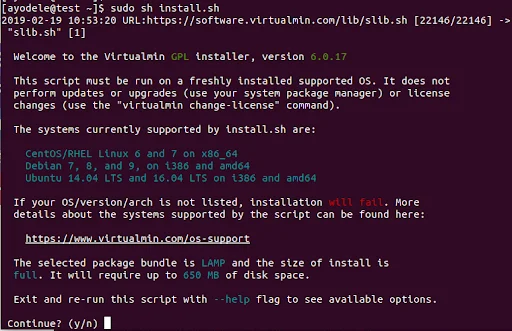
Execute the VirtualMin installation script.
sudo sh install.sh
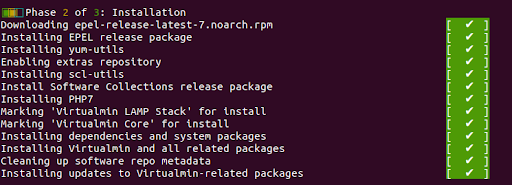
There are three (3) Phases to the installation:
Phase 1

Phase 2
Phase 3
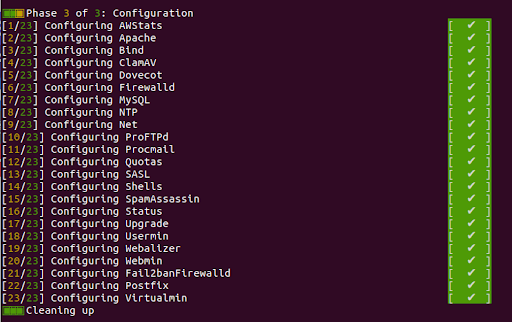

The above screenshot marks the end of the installation process.
Proceed to visit your domain on port 10000 on your browser with http://domain_name:10000 replacing domain_name with your domain name.
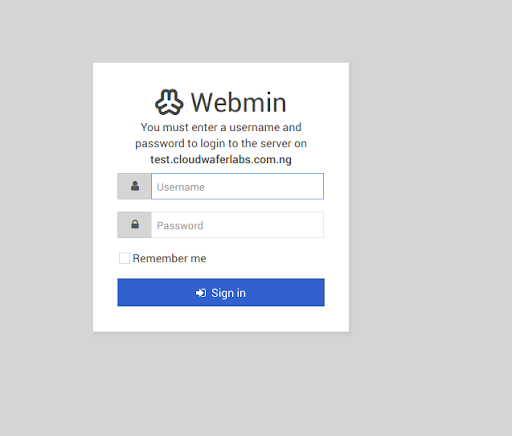
Enter root as the username and your root password in the password entry.
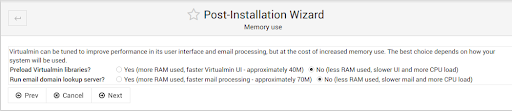
After logging in, next is the Post-Installation Wizard.
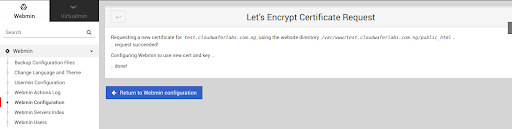
Adding a Valid Certificate with Let’s Encrypt
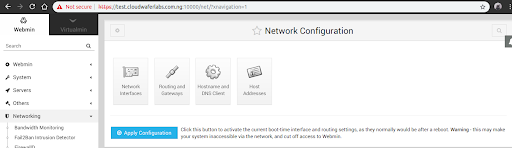
Under Webmin, navigate to Webmin Configuration, next click on SSL Encryption.
Navigate to the Lets’s Encrypt Section.
Also read: How Enable Username & Password Authentication for Linux EC2

Nirav Shah is the Director of Eternal Web Pvt Ltd, an AWS Advanced Consulting Partner and certified Odoo Partner based in the UK. With over a decade of experience in cloud computing, digital transformation, and ERP implementation, Nirav helps enterprises adopt the right technology to solve complex business challenges. He specialises in AWS infrastructure, Odoo ERP, and web development solutions for businesses across the UK and beyond.
Have queries about your project idea or concept? Please drop in your project details to discuss with our AWS Global Cloud Infrastructure service specialists and consultants.