June 6, 2025 / Nirav Shah
As AI tooling becomes more embedded in our daily development workflows, the quality of context we feed into LLMs is becoming just as important as the model itself. Tools like ChatGPT, Cursor, GitHub Copilot, and Claude are impressive — but without real-time, structured context, they’re still operating in the dark.
That’s where MCP (Model Context Protocol) comes in.
In this guide, I’ll walk you through running your own MCP server on AWS — giving your developers a secure, real-time context bridge to feed internal data into their AI tools.
MCP is a lightweight protocol that enables tools like IDEs, terminal assistants, or chat interfaces to fetch structured data from your internal systems and serve it as context to an LLM.
Think of it as an API that LLMs use to ask:
“Hey, what’s the latest deployment log for Project X?”
“Show me the last 10 commits touching auth.py.”
“What’s the sales data for March from our internal DB?”
Your MCP server listens for these structured requests, executes them securely, and returns rich JSON context.
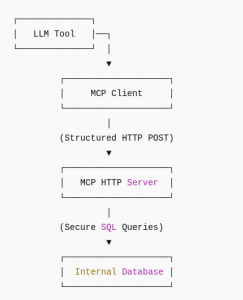
This walkthrough uses:
Boot an EC2 Instance
sudo apt install mysql-server -y

sudo mysql_secure_installation


CREATE DATABASE mcp_demo;

CREATE USER 'mcpuser'@'localhost' IDENTIFIED BY 'StrongPasswordHere';

GRANT ALL PRIVILEGES ON mcp_demo.* TO 'mcpuser'@'localhost';

FLUSH PRIVILEGES;

USE mcp_demo;

CREATE TABLE users (

  id INT AUTO_INCREMENT PRIMARY KEY,

  name VARCHAR(255),

  email VARCHAR(255),

  role VARCHAR(50)

);
Save as mcp_server.py:
from http.server import BaseHTTPRequestHandler, HTTPServer

import json, mysql.connector


class Handler(BaseHTTPRequestHandler):

    def do_POST(self):

        try:

            length = int(self.headers.get('Content-Length', 0))

            payload = json.loads(self.rfile.read(length))

            table = payload.get("table", "users")


            db = mysql.connector.connect(

                host="localhost", user="mcpuser",

                password="StrongPasswordHere", database="mcp_demo"

            )

            cur = db.cursor(dictionary=True)

            cur.execute(f"SELECT * FROM {table} LIMIT 100")

            rows = cur.fetchall()

            self.send_response(200)

            self.send_header('Content-Type', 'application/json')

            self.end_headers()

            self.wfile.write(json.dumps(rows).encode())


        except Exception as e:

            self.send_response(500)

            self.end_headers()

            self.wfile.write(f"Error: {e}".encode())


def run(): HTTPServer(('', 9000), Handler).serve_forever()

if __name__ == '__main__': run()
Test it:
curl -X POST http://<your-ec2-ip>:9000 -H "Content-Type: application/json" -d '{"table": "users"}'
Add HTTPS with Nginx + Certbot:
sudo apt install nginx certbot python3-certbot-nginx -y
Configure Nginx:
server {

    listen 80;

    server_name mcp.yourdomain.com;


    location / {

        proxy_pass http://localhost:9000;

    }

}

sudo certbot --nginx -d mcp.yourdomain.com
Done. You now have a production-ready, HTTPS-enabled MCP server.
Sample MCP Response:
[

  {

    "id": 1,

    "name": "Nirav Shah",

    "email": "nirav@example.com",

    "role": "Admin"

  },

]
Now that your MCP endpoint is live, you can register it in tools like:
They will now send structured POSTs like:
{ "table": "users" }
And your LLM will respond with live internal context.
Running your own MCP server unlocks:
You’re not just giving your AI access to context you’re taking control of it.


Nirav Shah is the Director of Eternal Web Pvt Ltd, an AWS Advanced Consulting Partner and certified Odoo Partner based in the UK. With over a decade of experience in cloud computing, digital transformation, and ERP implementation, Nirav helps enterprises adopt the right technology to solve complex business challenges. He specialises in AWS infrastructure, Odoo ERP, and web development solutions for businesses across the UK and beyond.
Have queries about your project idea or concept? Please drop in your project details to discuss with our AWS Global Cloud Infrastructure service specialists and consultants.