
January 8, 2021 / Nirav Shah
The SSH protocol is also called Secure Shell. It is a method for securely logging-in remotely from one computer to another.
To Enable root login over SSH:
As a root user, open the directory on /etc/ssh/sshd_config. Locate the PermitRootLogin as shown below.
sudo nano /etc/ssh/sshd_config
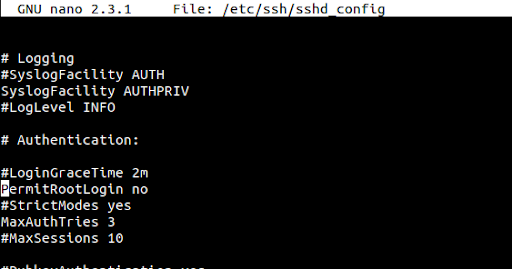
In the PermitRootLogin. is currently No. So. to enable root login, change the No to Yes as shown below:
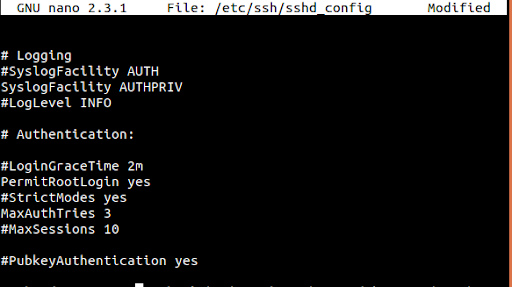
Save the file before closing and restart the SSH server.
sudo service sshd restart
For more information, read this guide on User Management for Ubuntu and CentOS.


Nirav Shah is the Director of Eternal Web Pvt Ltd, an AWS Advanced Consulting Partner and certified Odoo Partner based in the UK. With over a decade of experience in cloud computing, digital transformation, and ERP implementation, Nirav helps enterprises adopt the right technology to solve complex business challenges. He specialises in AWS infrastructure, Odoo ERP, and web development solutions for businesses across the UK and beyond.
Have queries about your project idea or concept? Please drop in your project details to discuss with our AWS Global Cloud Infrastructure service specialists and consultants.