
June 6, 2020 / Nirav Shah
Hibernation is now Available on AWS EC2, in this blog we explain to you how we can install hibernation on your running instances.
What is hibernation?
In simple words, it’s to pause your running instance when it is not required and resume them at a later time. Users can take advantage of this feature without the need of modifying your existing applications.
Steps for implementing hibernate on AWS
Step 1.
Sign in to your AWS account and lunch instance.
Step 2.
Connect the instance via putty or SSH
Something you have to know,
Hibernation on Amazon EC2 is provided by the linux-aws-hwe kernel package, version of 4.15.0-1058-aws, now available for Ubuntu 16.04 LTS.
Step 3.
Follow my instructions
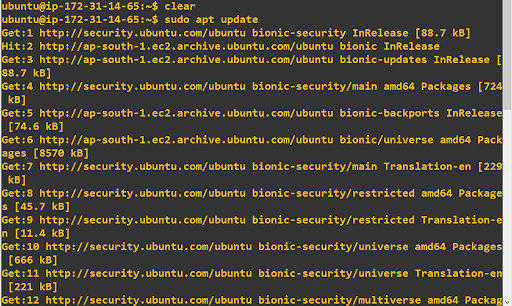
sudo apt update
Step 4.
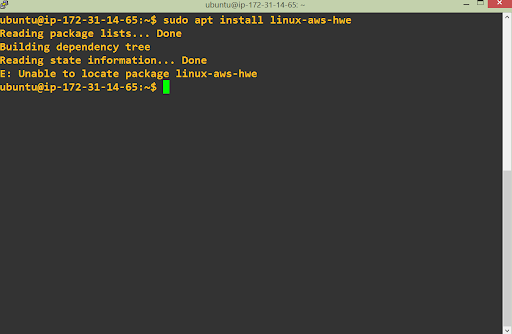
sudo apt install linux-aws-hwe
Step 5.
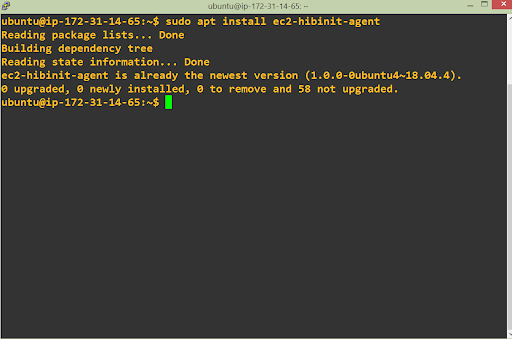
sudo apt install ec2-hibinit-agent
Step 6.
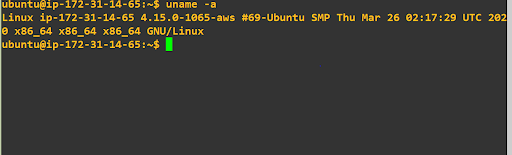
To confirm the correct kernel is now in use after the reboot, issue the following command.
uname -a
To learn more about Amazon EC2 Hibernation, please visit this blog. For information about enabling hibernation for your Amazon EC2 instances, please visit the Amazon EC2 Hibernation user guide.


Nirav Shah is the Director of Eternal Web Pvt Ltd, an AWS Advanced Consulting Partner and certified Odoo Partner based in the UK. With over a decade of experience in cloud computing, digital transformation, and ERP implementation, Nirav helps enterprises adopt the right technology to solve complex business challenges. He specialises in AWS infrastructure, Odoo ERP, and web development solutions for businesses across the UK and beyond.
Have queries about your project idea or concept? Please drop in your project details to discuss with our AWS Global Cloud Infrastructure service specialists and consultants.